
Levi Strauss & Co.
Order History Tabs
A tale on working with constraints.
The Challenge
A business request to combine online and in-store orders that turned into an opportunity to optimize Order History.
The Outcome
A simplified experience that optimizes loading performances, improves shoppers’ experience, and streamlines design system components.
1/ Background

An effort to improve Buy Online, Pickup In-store (BOPIS) experience led to a request from stakeholders to combine the 2 tabs in Order History, mainly to avoid confusion between BOPIS and In-Store orders.
Shoppers' tasks in Order History
— Check updates on their orders
— Manage post-purchase orders
This part of the journey is closely related to Customer Support, so we worked closely with the team to support their goals:
— Reduce customer support contacts, improve self-service support features.
— What Is the Status of My Order (WISMO) is the top call reason.

Information that are important to both business and shoppers:
1 — Arrival Date
2 — Order Status: Considering WISMO is a top call reason, this information is to be escalated earlier.
3 — Tracking/ Order-related CTAs: to allow shoppers to quickly take relevant, time-sensitive actions to their orders.
While not important for order management, these information are helpful to differentiate orders:
— Order method
— Order date
— Products images
2/ Design Exploration

While incorporated all initial basic asks, this variation was met with a few issues:
1 — Unscalable: Mixed fulfillment order are visually cluttered
2 — Order status cannot be pulled to Order History due to backend capability, so order date is used as the main order differentiation.
3 — Address: while takes up space, this is a key information that was lacking in Order Confirmation page, making it important to retain here for faster error resolution.
2/ API Deep Dive
The combination of tabs required our backend system to merge 2 separate API requests, in addition to requests from all elements on the order tile; all of which snowball and would severely affect loading time.
This led me to audit what exactly each element is calling, and how we can simplify.


1 — Items number & price: These information isn’t meaningful in this step for shoppers, therefore can be removed.
2 — Product thumbnails
— Linking each thumbnail to its respective PDP increased API usage without delivering meaningful value to shoppers.
— Each thumbnail pulls images from PDP, triggering up to 7 API calls. Since shoppers rarely order this many items, and primarily use thumbnails to differentiate orders, reducing the number of thumbnails while increasing their size would better balance API efficiency, visual clarity, and usability.
4/ Final Design
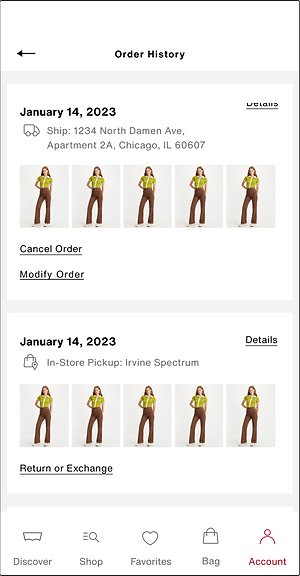
Summary of changes:
1 — Order number, Quantity and Price were removed. These information are still accessible in Order Details.
2 — Thumbnails are no longer linked to its respective PDP.
3 — Reduce thumbnails from 7 to 5, increasing size
4 — Fulfillment method is indicated with an icon for quick differntiation
5 — Other Design System changes: text links in place of CTAs for visual consistency, Details text link for accessibility clarity
These changes help the new combined page minimize API calls while maintaining fast page load times.
Takeaways
— The project showed me how to work with constraints, not against them,. The constraints uncovered points of optimization we would not have seen otherwise.
— A good reminder to constantly consult the development team to streamline design and technical capabilities.